

Visualize conversational search performance with Conversational
Conversational is the Empathy Platform Playboard data visualization tool used to analyze how shoppers interact with the conversational AI-powered search experience running in your commerce store.
You access the Conversational dataviz through the Insights landing page in the Playboard.
Try Conversational to…
- Understand how many shoppers use conversational search and how their behavior evolves over time.
- Detect opportunities to improve AI assistants, flows, and content by looking at underperforming conversations.
- Identify top-performing conversations that inspire merchandising, recommendations, and conversational content.
Getting started with Conversational
The Conversational data visualization shows the performance of any conversational AI-powered, generative search experience that your commerce store has integrated, such as an AI Carousel including suggestions, or a human-like conversational assistant that guides you through product search and discovery.
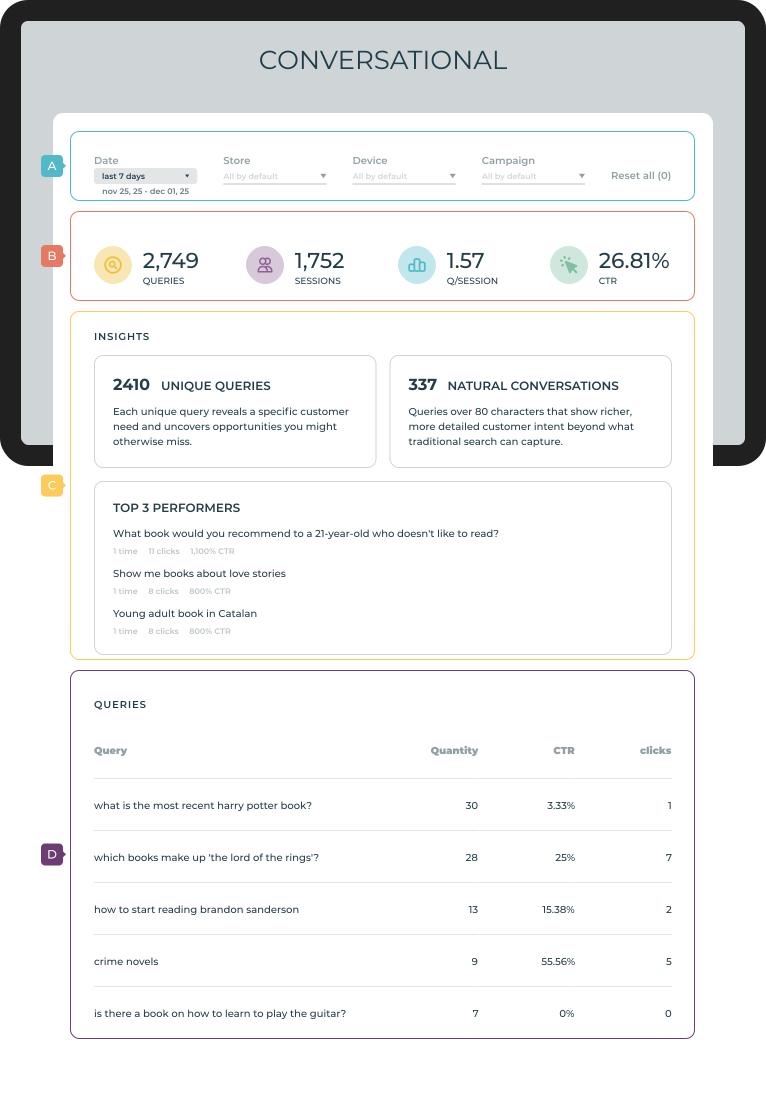
Conversational data visualization - (A) Header, (B) Conversational performance, (C) Conversational insights, and (D) Query performance table.
The data visualization has four main sections:
Header
The header (A) includes the date selector and the filters for the data (if applicable). The date selector is used to determine the date range for which the queries are presented. There are four different options:
- Today: queries performed over the current day.
- Last 7 days: queries performed over the last 7 days (default).
- Last 30 days: queries performed over the last 30 days.
- Custom date: queries performed over a selected date range.
Conversational performance
The Conversational performance (B) gives an at‑a‑glance view of how conversational search is performing over the selected period, with the following key indicators:
- Queries: Total number of conversational queries performed in your conversational experience.
- Sessions: Number of sessions in which at least one conversational query was made.
- Queries per session: Average number of conversational queries per session.
- CTR: Percentage of conversational queries that led to at least one click on recommended or returned products.
Conversational insights
The Conversational insights (C) surfaces qualitative conversational indicators and top performers with the following information:
- Unique queries: Total number of distinct conversational queries, revealing the intents that shoppers express in natural language.
- Natural conversations: Total number of queries classified as natural conversations, usually long, detailed texts above a configured character threshold that show richer intent.
- Top 3 performers: List of the three conversational queries that have the highest impact. Each query provides the following details:
- Times: Number of times the query has been performed.
- Clicks: Number of clicks on products resulting from the query.
- CTR: Percentage of clicks on products resulting from the query.
Query performance table
The Query performance table (D) displays a detailed table with all conversational queries that match the selected period and filters:
- Query: The exact conversational text entered by the shopper.
- Quantity: Number of times that query was submitted.
- CTR: Percentage of sessions in which this query led to at least one click.
- Clicks: Total number of clicks generated from results or recommendations shown after the query.
Use the table's action tools for visualization and navigation options. Select the number of Related Prompts to be displayed with the row selector. Navigate to the following page with the page navigation options. Download the data displayed with the Download icon.
interact
To know more about Related Prompts, check out the Related Prompts overview.